
To set up an AI chatbot on your website, choose a platform (managed, no-code, or custom-built), connect it to your knowledge base or website URL, customize the widget’s branding and tone, set human handoff rules, install the embed code before your </body> tag, then test before going live. No-code tools like ChatBot.com or Tidio can go live within a few hours.
Somewhere around 2 a.m., a visitor lands on your site with a question your team won’t see until morning. That gap between “I have a question” and “someone answers it” is exactly what pushes so many businesses to figure out how to set up AI chatbot on website pages in the first place.
Done right, it closes that gap without you hiring a night shift. This guide walks through the real setup process, honest pricing, and the mistakes that quietly make chatbots feel useless to the people trying to use them.
What Is an AI Chatbot (And How It Differs From a Standard Chatbot)
An AI chatbot uses large language models to generate original responses in real time, while a standard chatbot follows a pre-scripted decision tree and breaks when questions don’t match its script.
An AI chatbot uses large language models and natural language processing to generate original responses, rather than replaying a script someone wrote in advance. According to Google Cloud’s overview, this is the core distinction between AI chatbots and older rule-based systems.
That difference matters more than it sounds. A rule-based bot breaks the moment a visitor phrases a question slightly differently than expected. An AI chatbot, trained on your knowledge base, adapts to the actual wording a real customer uses.
Some platforms take this further with retrieval-augmented generation, where the chatbot searches your documents in real time instead of relying on what it memorized during setup. This matters most for businesses with frequently changing information, like inventory levels or seasonal policies.
AI Chatbot vs Rule-Based Chatbot vs Virtual Agent
Virtual agents sit a step further along this spectrum, built specifically for contact center-style interactions across multiple channels. For most website use cases, you’re choosing between a simple rule-based widget and a full AI chatbot — and the AI version almost always wins on flexibility.
3 Ways to Add an AI Chatbot to Your Website
You can add an AI chatbot through a fully-managed provider (easiest, most expensive), a no-code/low-code builder (best for most businesses), or a custom-built solution (full control, requires developers).
Fully-Managed Chatbot Providers
A managed provider builds, trains, and maintains the chatbot for you. You share your business details, and their team handles integrations, testing, and ongoing tuning.
This route is the easiest by far, but it comes at a cost. Managed platforms often charge in the range of thousands of dollars per month plus a per-resolution fee.
No-Code/Low-Code Chatbot Builders
This is where most small and mid-sized businesses land. You configure the bot yourself inside a dashboard — connecting your knowledge base, setting the tone, and defining when a conversation should escalate to a human.
Tools like Tidio, Crisp, and ChatBot.com fall into this category. Setup typically takes hours rather than weeks.
Custom-Built Chatbot
Building your own chatbot from scratch gives you full control over the AI model, backend, and integrations. But it demands real engineering resources.
Costs vary wildly depending on complexity. Simple rule-based systems start around $10,000, while advanced AI-powered builds with retrieval pipelines often reach well into six figures.
Step-by-Step: How to Set Up an AI Chatbot on Your Website
Once you’ve picked a path, the actual configuration follows a fairly consistent sequence regardless of which platform you choose.
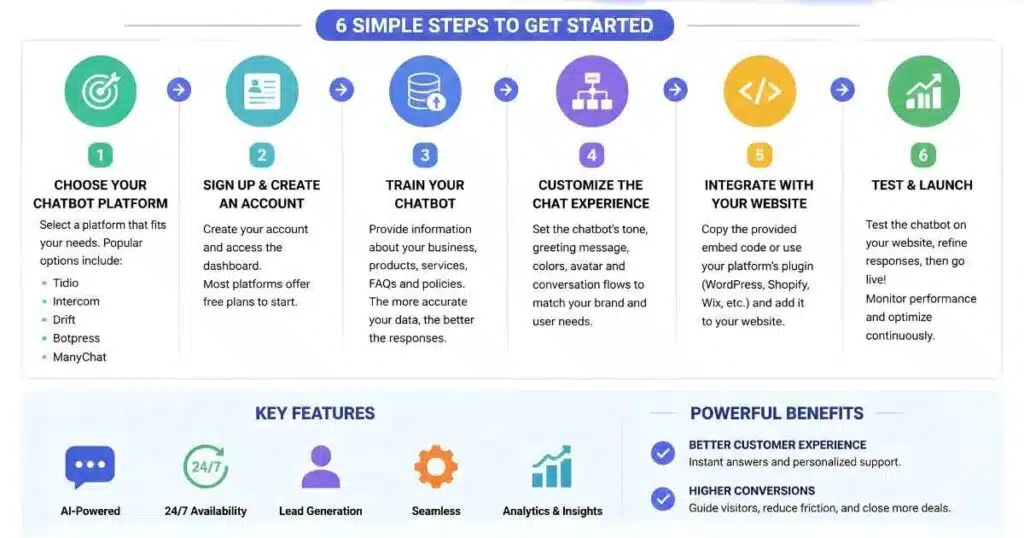
Step 1 — Choose Your Chatbot Platform
Match the platform to your team’s technical comfort and your budget. A solo founder with no developer on staff should lean toward a no-code builder rather than attempting a custom API integration.
Step 2 — Train the Bot on Your Website & Knowledge Base
Most modern platforms let you paste your website URL, and the tool scans your pages to build a starting knowledge base automatically. From there, you can add help center articles, product docs, or PDFs to fill in gaps the crawler missed.
Step 3 — Customize the Widget (Branding, Tone, Placement)
Set your colors, logo, and where the widget appears on the page. Tone matters more than most people expect — a mismatch between your brand’s actual voice and your chatbot’s scripted friendliness stands out fast to visitors.
Step 4 — Set Up Human Handoff Rules
Define exactly when the bot should step aside for a real person: explicit requests for a human, high-value customers, or sensitive topics like billing disputes. Skipping this step frustrates visitors stuck in an unhelpful loop.
Step 5 — Install the Code Snippet
Most platforms give you a short JavaScript snippet to paste before the closing </body> tag of your site, or a plugin if you’re on WordPress or Shopify.
Step 6 — Test Before Going Live
Open your site in an incognito window and run through real questions your customers actually ask, not just the obvious ones. Check that human handoff works and the widget displays correctly across devices.
How to Add a Chatbot Code Snippet by Platform
| Platform | Where to Add the Snippet |
|---|---|
| WordPress | Appearance → Theme File Editor, or a header/footer plugin |
| Shopify | Online Store → Themes → Edit Code → theme.liquid |
| Webflow | Project Settings → Custom Code → Footer Code |
| Wix | Settings → Advanced → Custom Code |
| Custom HTML/React | Paste before the closing </body> tag in your main template |
AI Chatbot Pricing Comparison
AI chatbot pricing ranges from free for basic tools to $100+/month for no-code platforms, $2,000+/month for fully-managed services, and $10,000–$500,000+ for custom-built solutions.
| Tier | Typical Cost | Best For |
|---|---|---|
| Free/Low-Cost | $0–$19/month | Small sites testing the waters |
| No-Code Mid-Tier | $19–$100+/month | Small to mid-sized businesses |
| Fully-Managed | $2,000+/month | Businesses wanting zero setup effort |
| Custom-Built | $10,000–$500,000+ | Enterprises needing full control |
Don’t assume the priciest option automatically performs best. A well-configured no-code tool with a clean knowledge base frequently outperforms an expensive custom build that nobody has time to maintain properly.
Real Business Results From AI Chatbots (Case Studies & ROI)
Numbers help cut through the marketing noise, so here’s one worth looking at closely.
Real-Life Example: Wembley Stadium’s Chatbot-Driven Revenue
Experiences by Wembley Stadium implemented an AI chatbot through ChatBot.com to handle its heavy volume of ticket and event inquiries. According to the published case study, the team removed the phone number from their website entirely, cutting non-sales-related calls, while the chatbot generated over $1.5 million in revenue within eight months.
That result didn’t come from novelty alone. The bot handled routine questions well enough that staff could focus on conversations that actually needed a human touch.
Data Privacy & Compliance for Website Chatbots
This section gets skipped in a lot of setup guides, which is a mistake if you’re collecting any customer information at all.
GDPR, CCPA & Consent Requirements
If your chatbot collects names, emails, or order details, you need a visible consent mechanism and a link to your privacy policy inside the widget itself. Requirements vary by region, so businesses serving EU or California customers should build consent flows in from day one.
What Not to Train Your Chatbot On
Avoid feeding your knowledge base sensitive customer records, payment details, or internal documents you wouldn’t want exposed if a transcript were ever reviewed by the wrong person. Treat your training data like any shared internal resource — useful, never a dumping ground for anything confidential.
Why Some AI Chatbots Get Ignored (And How to Fix It)
Chatbots get ignored mainly due to tone mismatches (overly scripted friendliness), missing human handoff options, outdated knowledge base content, and poor mobile display — not because the underlying AI model is weak.
Tone & Personality Mistakes That Hurt Completion Rates
One recurring complaint among real chatbot operators, shared across a community discussion on Elfsight’s forum, is that overly saccharine phrases like “totally understand” or excessive emoji use actually annoy visitors. Several operators reported that switching to neutral, direct responses noticeably improved completion rates.
That’s a useful reminder: people using a chatbot generally want a fast, accurate answer, not a performance of empathy. Match your tone to what your actual customers respond to.
Common Setup Mistakes to Avoid
- Launching without testing real customer phrasing, not just obvious sample questions.
- Skipping human handoff rules, trapping frustrated users in a loop.
- Uploading outdated or contradictory documents to the knowledge base.
- Ignoring mobile display, where most website traffic actually happens.
Conclusion — Choosing the Right AI Chatbot Setup for Your Business
Figuring out how to set up AI chatbot on website pages isn’t really about picking the fanciest platform. It’s about matching the setup to your actual traffic, budget, and technical comfort.
Wembley Stadium’s results came from a well-configured no-code tool, not an expensive custom build, which says a lot about where the real value sits. Start with one clear goal — cutting response time, capturing leads, or reducing repetitive support tickets — and build your chatbot around that single job first.
Frequently Asked Questions
Do I need coding skills to add a chatbot to my website?
No. Most no-code platforms let you paste your website URL and a short embed snippet, with direct plugins for WordPress and Shopify.
How much does an AI chatbot cost for a small business?
Expect anywhere from free to around $100 per month for most no-code tools, depending on features and conversation volume.
Can I add ChatGPT directly to my website?
Yes, through OpenAI’s API, though this requires custom development work rather than a simple embed. Most small businesses find a dedicated chatbot platform faster to launch.
How long does it take to set up a chatbot?
A no-code chatbot can go live within a few hours once your knowledge base is ready; fully custom builds can take weeks or months.
Is a free AI chatbot good enough for my website?
For basic FAQ handling and low traffic sites, often yes. Higher-traffic or sales-focused sites usually benefit from a paid tier with better analytics and handoff controls.

Abdul Manan is a professional SEO content creator and AI-SEO strategist at seofyai.com. He specializes in helping businesses rank higher on Google through AI-powered, data-driven content optimization. Connect on LinkedIn or visit seofyai.com for expert SEO tips.