

Does Google Workspace come with Gemini? Yes, and understanding exactly how it works changes the way your team operates every single day. Google built Gemini directly into Gmail, Docs, Sheets, Meet, and Chat, turning a familiar suite into a genuine AI-powered collaboration hub instead of disconnected apps. Rather than opening a separate chatbot tab, you get a built-in Google AI assistant that drafts emails, summarizes meetings, and organizes data right where you already work.
This shift toward AI productivity matters because switching tools constantly kills focus. Once you see how Gemini Workspace integration functions across paid tiers, choosing the right plan becomes far easier than most guides make it sound.
| Feature | Included in Workspace | Available as Add-on |
| Gemini in Gmail | Yes | No |
| Gemini in Docs | Yes | No |
| NotebookLM | Yes | Expanded Access |
| Advanced AI Video Generation | Limited | Yes |
| AI Expanded Access | No | Yes |
| Gemini Enterprise Features | Enterprise Plans | No |
What Is Gemini for Google Workspace?
Does Google Workspace come with Gemini? Yes, and it works directly inside Gmail, Docs, Meet, Sheets, Slides, Drive, and Chat instead of living as a separate app you have to switch to. Users get a Google AI assistant built right into the workspace they already use daily, creating smoother AI-powered collaboration and cutting the distraction of jumping between tools. The system behaves like a digital co-worker, writing, organizing, summarizing, and analyzing information the moment you need it.
The platform bundles advanced Google Workspace AI features like Gemini in Gmail, Gemini in Docs, Gemini in Sheets, and Gemini in Meet, so drafting emails, building reports, and analyzing spreadsheets all happen without leaving the app you’re already in.
This built-in AI productivity boost also strengthens planning and brainstorming, which is exactly why more businesses now treat these capabilities as essential rather than optional in a workplace that moves this fast.
How Gemini Works Inside Workspace Apps
The AI runs from a side panel that appears across every major Workspace application, so does Google Workspace come with Gemini in a way that actually feels integrated? It does. Users ask questions, summarize files, or generate text without opening another tab, and that setup strengthens Gemini Workspace integration because employees stay inside their workflow instead of bouncing between disconnected apps.
AI email generation in Gmail helps sales teams respond to clients faster, while AI document creation inside Docs helps marketers draft campaigns in minutes instead of hours. The experience feels natural because the AI pulls context from emails, meetings, and documents already stored in Workspace, turning the whole suite into one of the most practical AI tools for teams available today.
Which Google Workspace Plans Actually Include Gemini
Not every plan includes it by default, so does Google Workspace come with Gemini on every tier? Not quite. Business Standard and Business Plus plans include Gemini as an add-on or bundled feature depending on region, while Enterprise plans typically bundle it in fully.
Personal Google accounts get a lighter version of Gemini, but the deep Workspace integration — the side panel inside Docs, Sheets, and Gmail — is reserved for paid Workspace tiers, which is the detail most comparison articles skip entirely.
Google Workspace Pricing Changes in 2026
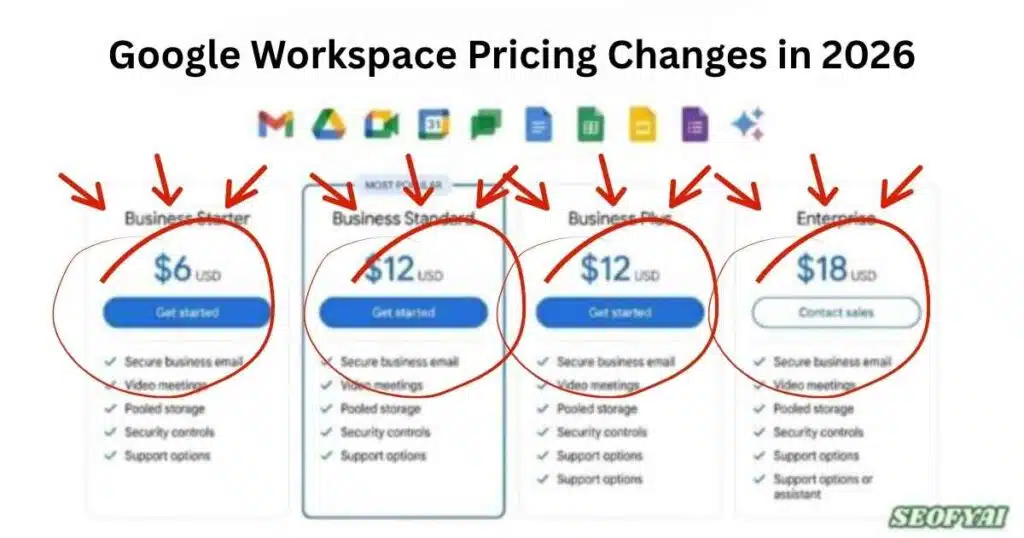
Google changed its pricing structure significantly in 2026 by embedding Gemini directly into many Workspace subscriptions. Previously, businesses had to purchase Gemini as a separate add-on. That older approach frustrated many organizations because AI costs increased rapidly across larger teams. The updated structure simplified adoption by combining AI access into standard Workspace plans.
The revised Google Workspace Gemini pricing model increased subscription fees slightly, yet it also delivered more value. Businesses now receive integrated AI assistance across communication and collaboration tools without requiring additional software licenses. That shift positioned Google competitively against Microsoft Copilot and other enterprise AI platforms entering the market.
| Workspace Plan | Gemini Included | Best For |
| Business Starter | Limited | Small teams |
| Business Standard | Yes | Growing businesses |
| Business Plus | Advanced | Mid-size companies |
| Enterprise | Full Access | Large organizations |
Why Pricing Increased
Google expanded AI infrastructure dramatically to support millions of users generating text, images, analytics, and automation requests daily. Running advanced language models requires substantial computing power. As a result, pricing adjustments became necessary to maintain reliable service and scalable performance across enterprise environments.
At the same time, businesses gained access to premium capabilities like AI workflow automation, AI-powered automations, and advanced collaboration features. Many organizations discovered the time savings justified the increased costs because employees completed tasks much faster than before.
Is Gemini Included in Google Workspace Plans?
Yes, Gemini now comes included with many Google Workspace subscriptions. However, the exact level of access depends on the selected plan. Business Standard, Business Plus, and Enterprise plans offer broader AI functionality while lower-tier plans may provide limited access to selected tools only.
The inclusion of Gemini AI for business changed how organizations evaluate workplace software. Companies no longer need separate AI subscriptions for writing, brainstorming, note-taking, or workflow management. Instead, AI capabilities exist directly inside the existing productivity suite employees already understand.
Which Plans Include Gemini?
Most modern Gemini Workspace plans include core AI tools such as writing assistance, meeting summaries, and intelligent document support. Enterprise subscriptions provide expanded capabilities including advanced analytics, enhanced governance, and larger AI processing limits designed for bigger organizations managing sensitive data.
Google also offers AI Expanded Access for companies needing additional generation capacity. This add-on unlocks advanced AI video generation, higher AI limits, and more sophisticated enterprise capabilities. Organizations using heavy automation often choose this option to scale operations more efficiently.
Google Workspace Business Standard + Gemini: Best Value Plan?
Business Standard hits the strongest balance between affordability and real functionality, which answers a version of does Google Workspace come with Gemini that most buyers actually care about: which plan makes sense for a normal-sized team.
Small and mid-size companies gravitate toward this tier because it bundles essential AI tools without enterprise-level pricing attached. Teams get storage, collaboration software, AI writing support, and intelligent meeting tools inside one subscription instead of stitching together separate tools.
This plan supports AI for small businesses particularly well because it strips out technical complexity most enterprise tiers pile on. Employees start using AI for writing, planning, customer communication, and project coordination almost immediately, and onboarding feels smooth since Gemini integrates directly into Workspace apps people already know how to use.
Why Businesses Prefer This Plan
Organizations keep calling Business Standard the sweet spot because it delivers practical daily AI functions rather than overwhelming enterprise controls nobody on a 20-person team actually needs. Marketing teams lean on AI presentation tools while operations departments use workflow automation to strip out repetitive manual tasks.
Remote teams benefit even more from AI note-taking in Meet, which captures key discussion points automatically instead of requiring someone to type notes by hand. That single improvement frees employees to focus fully on the conversation itself, and across a larger team, it quietly saves hours every single week.
Gemini AI Features Available in Google Workspace
The platform includes an impressive collection of modern AI capabilities. Gemini in Google Workspace supports writing, editing, research, visualization, automation, and collaboration across nearly every productivity scenario. The integrated design creates smoother workflows because users never need to leave Workspace to access AI assistance.
Popular tools include Gemini in Slides for visual storytelling, Gemini in Drive for file analysis, and Gemini in Chat for conversational workplace support. Together, these functions transform Workspace into a complete enterprise productivity platform powered by intelligent automation.
| AI Feature | Purpose |
| Gemini in Gmail | Email drafting |
| Gemini in Docs | Writing assistance |
| Gemini in Sheets | Data analysis |
| Gemini in Slides | Presentation generation |
| Gemini in Meet | Meeting summaries |
| NotebookLM | Research and knowledge management |
Advanced AI Tools
Google expanded beyond simple writing tools by introducing NotebookLM features and AI-powered notebooks designed for advanced research and collaboration. Teams can upload sources, generate summaries, build AI mind maps, and create podcast-style summaries for easier learning.
The platform also supports Gemini in AppSheet, allowing companies to build applications through natural language app creation instead of traditional coding. This innovation simplifies internal software development and strengthens no-code AI automation across departments.
How Gemini Improves Productivity for Businesses
Modern workplaces waste enormous time on repetitive communication and manual organization. Workspace with Gemini features eliminate much of that inefficiency through intelligent automation. Employees spend less time drafting emails, summarizing meetings, or organizing documents. Instead, they focus on strategic work requiring human creativity and judgment.
The platform also supports stronger AI workplace transformation because teams collaborate faster across departments. Sales, marketing, finance, and operations all work inside connected systems powered by shared AI intelligence. That alignment improves consistency and reduces workflow bottlenecks significantly.
Real Business Impact
A marketing agency can use AI image generation and AI infographic creator tools to build campaign assets quickly. Meanwhile, finance teams leverage intelligent document analysis for faster reporting and budgeting workflows. These practical applications create measurable productivity gains across organizations.
Companies managing distributed employees benefit from AI for remote teams because communication becomes easier and more organized. AI-generated summaries help workers stay aligned even when operating across multiple time zones. That consistency improves project delivery and reduces costly misunderstandings.
Gemini Security, Privacy & Data Protection
Security remains one of the biggest concerns surrounding workplace AI adoption. Google addresses this issue through advanced enterprise-grade AI infrastructure designed specifically for organizations handling sensitive information. The company applies encryption, access controls, and governance systems throughout the Workspace ecosystem.
Businesses using secure AI collaboration tools need confidence that confidential information remains protected. Google states that Workspace customer data isn’t used to train public AI models without permission. This distinction matters greatly for healthcare, finance, and legal industries managing private records.
Enterprise Privacy Controls
The platform includes extensive AI governance tools and organization data control systems. Administrators can monitor AI usage, restrict sensitive actions, and define internal policies governing employee interactions with Gemini. These controls improve compliance across regulated industries.
Google also emphasizes business data privacy through centralized administration settings and enterprise security frameworks. Combined with a secure AI platform, these protections help organizations adopt AI confidently while maintaining operational oversight.
Admin Controls & Managing Gemini Access
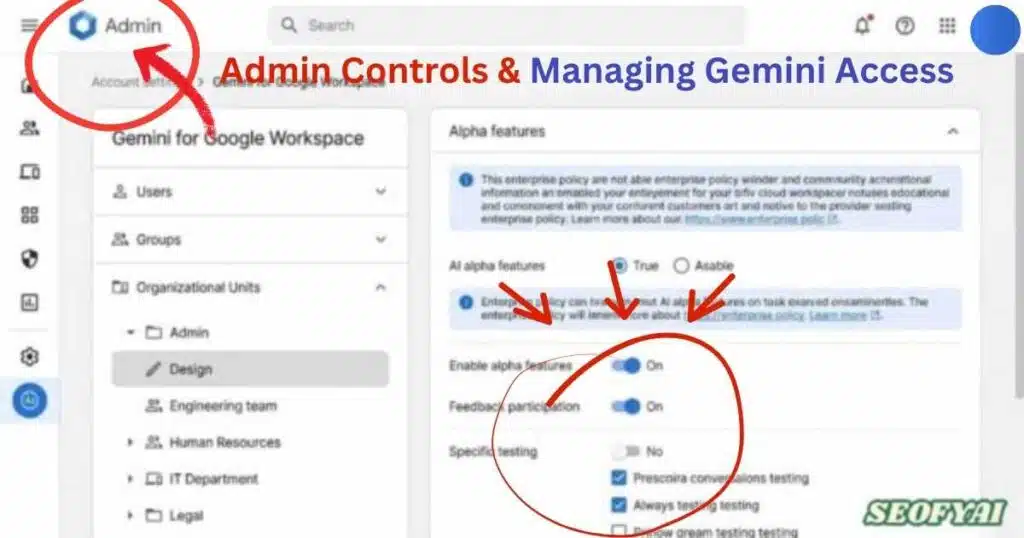
Workspace administrators maintain extensive control over Gemini access. They can enable or disable AI tools for specific departments, users, or organizational units. This flexibility matters because not every team requires identical AI capabilities.
Many companies gradually deploy AI systems to test productivity improvements before expanding access organization-wide. This phased strategy helps leaders measure performance gains while reducing operational risk during implementation.
Managing AI Responsibly
Organizations increasingly establish internal AI usage policies defining acceptable workflows and data-sharing practices. Responsible deployment strengthens security while encouraging productive AI adoption across departments.
Google supports this process through centralized management dashboards offering analytics, permissions, and monitoring tools. These systems simplify governance across large teams using advanced business automation tools and scalable AI infrastructure.
Is Google Workspace With Gemini Worth It?
For many organizations asking does google workspace come with gemini, the value becomes clear through improved productivity, automation, and streamlined collaboration. Integrated AI features reduce repetitive tasks while enhancing communication efficiency across teams. Consequently, businesses using Google Workspace AI often experience faster workflows, stronger consistency, and better operational performance throughout daily processes.
The greatest advantage behind does google workspace come with gemini lies in convenience and seamless workflow integration. Employees no longer switch between disconnected applications because AI capabilities exist directly inside familiar productivity tools. This unified experience improves adoption rates significantly while strengthening long-term efficiency through centralized collaboration and smarter task automation.
Gemini vs Microsoft Copilot
Businesses researching does google workspace come with gemini frequently compare it against Microsoft Copilot before making software decisions. Google prioritizes cloud collaboration, browser-based productivity, and real-time teamwork features. As a result, organizations already operating inside the Google ecosystem often find Gemini more intuitive, scalable, and easier to implement.
Meanwhile, companies deeply invested in Microsoft Office may still prefer Copilot for desktop-focused environments. However, many professionals believe Google offers cleaner usability and stronger collaborative workflows. Ultimately, choosing between these platforms depends on operational priorities, existing infrastructure, and how effectively each system supports long-term productivity goals.
Final Verdict: Should You Use Gemini for Google Workspace in 2025?
Businesses seeking modern productivity tools should seriously consider Google Workspace with Gemini. The platform combines communication, automation, research, collaboration, and AI assistance inside one connected environment. That integration simplifies workflows while helping teams operate faster and more efficiently.
As AI technology evolves, Workspace continues expanding into advanced automation, intelligent collaboration, and creative generation. Organizations adopting these tools early may gain competitive advantages through better efficiency, faster communication, and smarter operational workflows.
The Future of Workspace AI
Google continues investing heavily in generative AI for work, advanced automation systems, and smarter workplace intelligence. Future updates will likely expand personalization, predictive workflows, and AI-assisted project management.
The broader shift toward AI business solutions suggests workplace software will increasingly function as intelligent digital assistants rather than passive productivity tools. Companies adapting early may position themselves ahead of competitors still relying on manual workflows.
Conclusion
In 2026, the answer to “does Google Workspace come with Gemini” is clearly yes for most modern Workspace plans. Google has transformed its productivity suite into a smarter ecosystem powered by Google Workspace with Gemini, helping businesses automate repetitive tasks, improve communication, and streamline collaboration. From Gemini in Gmail and intelligent meeting summaries to advanced research and AI workflow automation, the platform delivers practical value for teams of every size.
Companies looking for faster operations, stronger AI-powered collaboration, and scalable productivity tools will likely find Gemini a worthwhile investment. As workplace AI continues evolving, Google Workspace stands out as one of the most complete and future-ready business platforms available today.
Frequently Asked Questions
Do I get Gemini free with Google Workspace?
Yes, Google Workspace includes Gemini AI features for free on Business, Enterprise, and certain Education plans since December 2024. Personal and Starter plans require a separate Gemini add-on subscription costing $20-30 per user monthly.
Is Gemini part of Google Workspace?
Yes, Gemini is integrated into Google Workspace applications like Gmail, Docs, Sheets, and Meet for eligible plans. The AI-powered features include smart compose, data analysis, image generation, and meeting summaries across Google Workspace tools.
How much is Gemini for Google Workspace?
Gemini for Google Workspace costs $20/user/month for Business Starter or $30/user/month for Enterprise add-ons, but it’s included free with Business Standard, Plus, and Enterprise plans. Educational institutions receive Gemini AI at discounted rates or free depending on licensing agreements.
How do I add Gemini to my Google Workspace?
Access your Google Workspace Admin Console, navigate to Apps > Google Workspace > Gemini, and toggle it on for users or organizational units. If not included in your plan, purchase the Gemini add-on through billing settings or contact your Google sales representative.
Why is Gemini not working with Google Workspace?
Gemini features may not work due to admin restrictions, unsupported Google Workspace plan tiers, regional availability limitations, or disabled user permissions. Check Admin Console settings, verify your subscription includes Gemini AI, and ensure users have proper access rights enabled.

Abdul Manan is a professional SEO content creator and AI-SEO strategist at seofyai.com. He specializes in helping businesses rank higher on Google through AI-powered, data-driven content optimization. Connect on LinkedIn or visit seofyai.com for expert SEO tips.