

A Claude SEO workflow for bloggers breaks content production into 7 stages — keyword research, topic clustering, brief generation, drafting with voice constraints, on-page optimization, editorial review, and repurposing — each run as a separate, structured prompt rather than one generic request.
Most bloggers treat Claude like a faster version of Google Docs — paste a topic, get a draft, publish, repeat. That approach works occasionally, but it rarely compounds into real traffic growth.
A proper Claude SEO workflow for bloggers treats the model as a structured production system instead, one that handles research, outlining, drafting, and optimization as distinct, connected stages. This guide walks through that full workflow, including where Claude genuinely helps, where it falls short, and a real blogger’s results to set honest expectations.
If you’re building a genuine Claude SEO workflow for bloggers habit rather than a one-off experiment, the stages below are worth bookmarking.
What Is the Claude SEO Workflow (And Why It’s Different From ChatGPT for Bloggers)
Claude tends to reason through longer, more coherent arguments than ChatGPT, making it stronger for in-depth articles and editorial review, while ChatGPT’s browsing-capable tiers handle real-time competitor checks better.
Claude and ChatGPT can both draft blog posts, but they behave differently once you push past surface-level writing. Claude tends to reason through longer arguments more coherently, which matters for content that needs to demonstrate real depth rather than just cover a topic superficially.
That said, neither tool replaces the strategic thinking a content strategy actually requires. The workflow only works when you supply the structure — target keyword, intent, audience, and voice constraints — rather than expecting the model to guess your goals from a vague prompt.
Think of it this way: Claude is a very capable production engine, not a strategist sitting in for you. It writes faster and often more coherently than a first draft you’d produce alone, but it still needs you to decide what the article should accomplish before it starts typing.
Claude vs ChatGPT for SEO Content — Honest Comparison
| Factor | Claude | ChatGPT |
|---|---|---|
| Long-form reasoning depth | Generally stronger | Solid, occasionally shallower |
| Following complex structural instructions | Very reliable | Reliable, sometimes drifts |
| Real-time SERP/web data | No native browsing in base chat | Has browsing in some tiers |
| Cost for heavy use | $20/mo Pro or API-based | $20/mo Plus or API-based |
| Best use case | Deep articles, editorial review | Quick drafts, brainstorming |
Neither tool wins outright. Many bloggers running a serious Claude SEO workflow for bloggers setup still use ChatGPT or a browsing-capable assistant for real-time competitor checks, since Claude’s base chat interface doesn’t crawl live search results on its own.
The Complete Claude SEO Workflow (7 Stages)
The 7 stages are keyword research, topic clustering, brief generation, drafting with a brand voice lock, on-page SEO optimization, editorial review, and repurposing into secondary formats.
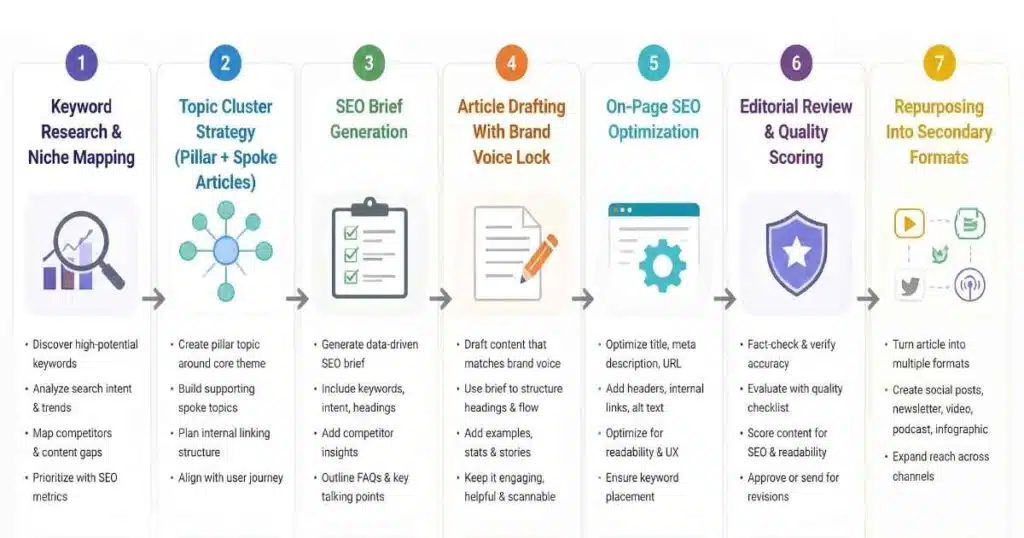
Breaking the process into distinct stages, each with its own prompt, produces noticeably better output than asking for a finished article in one shot. This is the backbone of any reliable Claude SEO workflow for bloggers setup, whether you’re publishing weekly or once a month.
Stage 1 — Keyword Research & Niche Mapping
Start by feeding Claude your niche and a seed keyword, asking it to map out realistic sub-topics rather than generic suggestions. Claude can’t check real search volume, so pair this step with a free tool like Google Keyword Planner or Ubersuggest before committing to a target.
Stage 2 — Topic Cluster Strategy (Pillar + Spoke Articles)
Organize your content around one pillar page and several supporting articles, each targeting a related keyword and linking back to the hub. This structure builds topical authority over time, since each new post reinforces the ones around it rather than existing in isolation.
Stage 3 — SEO Brief Generation
Give Claude your target keyword, search intent, audience description, and word count ceiling, then ask for a heading structure where each H2 makes a specific statement rather than a vague label. Specific headings like “Why X causes Y” outperform generic ones like “Key Considerations” for both readability and search relevance.
Stage 4 — Article Drafting With Brand Voice Lock
Claude’s default tone is polished but generic. Supply a concrete voice description, a list of banned filler phrases, and a rule against opening with a dictionary-style definition, then draft section by section rather than the whole piece at once for tighter control.
Stage 5 — On-Page SEO Optimization
Once the draft exists, ask Claude to generate meta titles under 60 characters, meta descriptions under 155 characters, and FAQ schema in JSON-LD format. This step gets skipped constantly, yet it directly affects click-through rates and how AI search engines cite your content.
Stage 6 — Editorial Review & Quality Scoring
Run the finished draft back through Claude with a structured checklist: keyword placement, paragraph length, hedging language, and heading specificity. Treating Claude as an editorial checklist here catches issues human review often misses when moving quickly.
Stage 7 — Repurposing Into Secondary Formats
A single article can become a LinkedIn post, a short newsletter blurb, or social captions with the same source material reformatted for each platform. This step multiplies the return on the research and drafting work you already did.
Copy-Paste Prompts for Each Stage
Structured prompts beat vague ones consistently. Here’s a compact version for the brief stage, adaptable to the others above:
Create an SEO article outline for the keyword: "[TARGET KEYWORD]"
Intent: [informational/commercial/etc.]
Audience: [describe your reader]
Word count: [target]

Rules:
- 5-7 H2s maximum, each a specific statement, not a vague label
- Include a TL;DR after the intro
- Include an FAQ section with 5 search-query-format questions
- Flag 2-3 internal link opportunities by topic
Real Blogger Example — Time Saved & Traffic Results
Real-Life Example: Doubling Organic Traffic Through Content Updates
Marketing writer Nick Nolan spent several months using Claude to update older blog posts on his company’s site rather than only drafting new ones. According to his account published on Medium, the results were substantial: site-wide impressions doubled, average search position improved from 27 to 10.7, and monthly clicks climbed from roughly 565 to over 1,000.
The lesson worth taking from that result: a Claude SEO workflow for bloggers doesn’t only apply to fresh content. Feeding Claude your existing underperforming posts and asking it to identify specific, fixable gaps often produces faster wins than writing something brand new.
How Long Does Claude SEO Workflow Actually Take? (Time Breakdown)
A full Claude SEO workflow takes roughly 2-3 hours per article, compared to 6-8 hours for a fully manual research-and-write process.
| Phase | Time (Approx.) |
|---|---|
| Research & keyword mapping | 20–30 minutes |
| Brief & outline generation | 15–20 minutes |
| Section-by-section drafting | 45–90 minutes |
| Editorial review & optimization | 20–30 minutes |
| Total | ~2–3 hours per article |
The time savings compound fastest for bloggers publishing weekly, where every hour saved per post adds up across a full content calendar.
Setting Up Claude Custom Instructions for SEO Blogging
Saving your voice guidelines, banned phrases, and structural rules as reusable custom instructions means you’re not rewriting the same context every session. A workable starting template includes: your niche and audience in two sentences, three to five voice descriptors, a short banlist of filler phrases, and a standing rule to always include a TL;DR and FAQ section.
Common Claude SEO Workflow Mistakes (And How to Fix Them)
Even a well-built workflow breaks down at a few predictable points.
- Vague prompts — “write about X” produces generic outlines; specify keyword, intent, and audience every time.
- Skipping intent classification — writing a how-to guide when the SERP actually rewards comparison tables wastes the whole effort.
- No brand voice constraints — unedited Claude output reads recognizably like AI; a voice description and banlist fix most of this.
- Ignoring the knowledge cutoff — Claude can’t verify current rankings or trending topics on its own; pair it with Google Search Console data.
When Claude SEO Workflow Fails (Honest Limitations)
Claude can’t browse live search results, verify real-time keyword difficulty, check your actual backlink profile, or predict viral content — it works best paired with real data like Search Console exports.
Claude’s base chat interface doesn’t browse live search results, so it can’t confirm real-time keyword difficulty, current SERP layouts, or your actual backlink profile. It also can’t predict what content will go viral, and it shouldn’t be trusted to fact-check itself on numerical claims or breaking news.
None of that makes the workflow less useful. It just means Claude works best as the production engine, with real data — Search Console exports, a keyword tool, your own judgment — as the input that tells it what to actually produce.
Conclusion — Should You Build Your Blog Around a Claude SEO Workflow?
A structured Claude SEO workflow for bloggers earns its place when you treat each stage — research, outlining, drafting, optimization, review — as a distinct step rather than one long prompt. Nick Nolan’s traffic results came specifically from disciplined content updates, not a single lucky article.
Start with one underperforming post, run it through the full workflow, and measure whether rankings and clicks actually move before scaling up to your whole archive. That measured approach beats publishing faster without knowing if the process is actually working.
Frequently Asked Questions
How often should I run the Claude SEO workflow?
Weekly for actively growing blogs, every two weeks for slower-growth sites, and monthly for revisiting older archive content.
Do I need Claude Pro or an API key for this workflow?
Claude Pro at $20/month covers unlimited chat-based use for most solo bloggers; the API suits batch processing across many articles at once.
How do I stop Claude’s writing from sounding AI-generated?
Supply a specific voice description, a banlist of hollow phrases like “in today’s landscape,” and manually rewrite the opening two sentences yourself — the default openers are the most recognizable pattern.
Can Claude analyze my Google Search Console data for content gaps?
Yes. Exporting your GSC data as a CSV and asking Claude to flag high-impression, low-CTR queries is one of the most effective uses of the tool for existing content.
Is this workflow better suited to evergreen or trending content?
Evergreen content fits better, since Claude can’t verify real-time trending topics or current SERP volatility on its own.

Abdul Manan is a professional SEO content creator and AI-SEO strategist at seofyai.com. He specializes in helping businesses rank higher on Google through AI-powered, data-driven content optimization. Connect on LinkedIn or visit seofyai.com for expert SEO tips.