

Most guides on Perplexity assume you have Pro or stop at click subscribe without explaining what happens next. Neither approach tells you how to set up Perplexity Pro from a blank account or what you are paying for. This guide covers the entire process, picking the right plan, subscribing in under three minutes, and running your first Pro Search once billing confirms.
Pro Search unlocks deeper answers, Research mode digs through sources at once, and Labs turns findings into dashboards without writing code. None of it requires technical skill. By the end, you will have a working Pro account and a clear sense of when the upgrade earns its cost.
Key Takeaways
- Subscribing takes about 3 minutes: sign up, open account settings, select Pro, confirm payment.
- Pro costs $20/month or $200/year (annual saves ~17%); Max costs $200/month for unlimited Labs.
- Students with a .edu email can get Education Pro for around $9/month.
- Set your AI data retention preference during setup, not after sharing sensitive queries.
- Cancel anytime through account billing settings; app store subscriptions cancel through Apple/Google instead.
- The free tier caps at 5 Pro Searches a day; upgrade once that limit interrupts real work.
Perplexity Free vs Pro vs Max: Which One Do You Need?
The free plan handles casual searches well, offering unlimited quick answers but capping Pro Search at five per day. That limit fills up fast if you use Perplexity for anything beyond occasional fact-checking, and hitting it mid-research session is exactly the moment most people start considering an upgrade.
Pro costs $20 a month or $200 annually, unlocking 300+ Pro Searches daily, advanced AI models, and 50 Labs queries a month for building dashboards and simple apps. Max runs $200 a month and adds priority access to Perplexity’s most capable models along with unlimited Labs usage, aimed at heavy users and professionals who lean on AI research daily rather than occasionally.
For most people learning how to set up Perplexity Pro for the first time, the standard Pro tier covers everything needed without paying for capacity you won’t use. Jumping straight to Max before you’ve even tested Pro’s limits usually means overpaying for headroom you may never touch.
How to Subscribe to Perplexity Pro: Step by Step
Setting up Perplexity Pro takes about three minutes from a blank account to an active subscription, which makes it one of the faster upgrades in the AI tools space.
- Visit perplexity.ai and sign up or log in using email, Google, or Apple.
- Open account settings from the sidebar profile icon.
- Select the Pro plan and choose your billing cycle (monthly or annual).
- Enter payment details — credit card, debit card, or app store billing if subscribing via mobile.
- Confirm the purchase. Pro features activate immediately, with no waiting period.
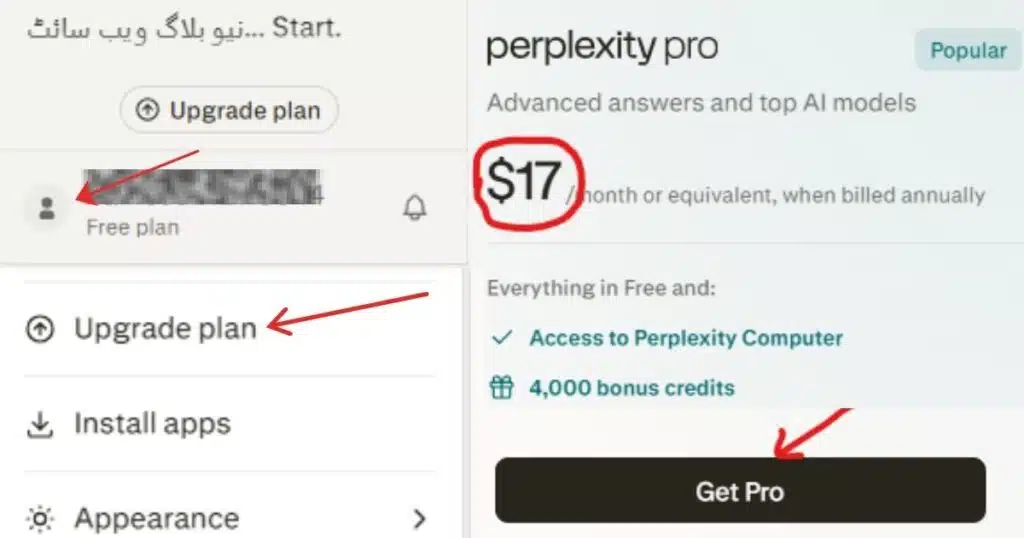
If you’ve been wondering exactly how to set up Perplexity Pro without digging through scattered help articles, that five-step sequence is genuinely the entire process.
Monthly vs Annual Billing: Which Saves More
Annual billing runs $200 a year, working out to roughly $16.67 a month, about 17% cheaper than paying $20 monthly. If you’re confident you’ll use Perplexity regularly for at least six months, the annual plan pays for itself in savings alone. If you’re still testing whether Pro fits your workflow, start monthly and switch to annual once you know you’ll keep it.
How to Get Perplexity Pro Free (Student and Promo Options)
Several legitimate routes exist for accessing Pro without the standard subscription cost. Students and educators with a valid .edu email can apply for Education Pro, priced around $9 a month after verification through SheerID, a substantial discount off the standard rate that most students never bother checking for before paying full price.
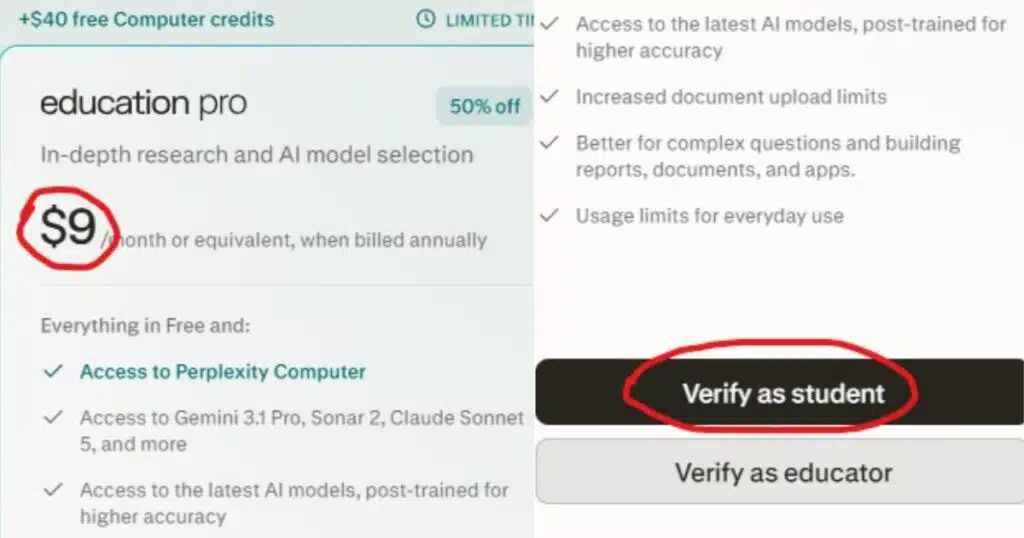
Beyond education, carrier and device partnerships occasionally bundle free Pro access, including promotions tied to specific phone purchases or mobile carriers in certain regions. These offers rotate and vary by country, so checking your account settings or Perplexity’s official promotions page before assuming you qualify saves wasted time chasing outdated deals shared in forums months after they expired.
None of these free routes involve sharing accounts or bypassing payment entirely, since Perplexity ties every promotional offer to account-specific verification. Trying to work around that verification usually just wastes more time than paying the standard rate would have.
Setting Up Your Profile After You Subscribe
Once your subscription activates, spend five minutes on profile setup before diving into searches, since this step gets skipped constantly and quietly limits how useful the tool feels for weeks afterward. Add a brief description of your role and interests, since this personalization noticeably improves how relevant your answers feel over the following weeks.
Check your AI data retention setting too. Leaving it on helps responses improve over time through better personalization, while turning it off suits anyone running sensitive research or confidential business queries.
This single setting matters more than most beginners realize, and adjusting it during setup beats discovering the option months later after you’ve already run dozens of sensitive queries under the default configuration.
How to Use Pro Search, Research Mode, and Labs for the First Time
Pro unlocks three distinct modes, and each solves a different problem, so knowing which one to reach for matters as much as knowing they exist. Search mode gives fast, cited answers to everyday questions, functioning like an upgraded version of the free tier with a much higher daily ceiling. Research mode analyzes dozens of sources and produces detailed reports in three to five minutes, ideal for literature reviews or market analysis.
Picture a freelance market researcher preparing a competitive analysis for a client on a tight deadline. Instead of manually opening twenty browser tabs and cross-referencing sources by hand, she activates Research mode, enters a detailed prompt specifying the companies and metrics she needs, and receives a structured report with citations in under five minutes, work that would otherwise eat an entire afternoon.
That’s the practical payoff Pro delivers once you move past basic search into something closer to genuine research assistance.
Labs, the third mode, turns research into interactive dashboards and simple web apps without writing code, though it takes ten to thirty minutes depending on complexity. Save your first attempt for something low-stakes, since getting comfortable with prompt structure across all three modes takes a bit of trial and error before the results start feeling reliably useful.
Mobile vs Desktop Setup: What’s Different
Desktop setup gives you the full feature set immediately, including Labs and detailed Spaces configuration, on a larger screen better suited to longer prompts. Mobile setup mirrors the same account, just accessed through the app after installing it from the App Store or Google Play and logging in with the same credentials.
One practical difference worth knowing: subscriptions purchased through the mobile app often route through Apple or Google’s billing systems rather than Perplexity’s own payment page, which affects how you’ll later manage or cancel that subscription. Setting up on desktop first, then simply logging into the mobile app afterward, avoids that complication entirely.
Common Setup Mistakes to Avoid
The most frequent mistake is subscribing without checking whether a free promotional route already applies, since students and certain carrier customers overpay by skipping a two-minute eligibility check before entering payment details. A second common mistake is ignoring the AI retention setting entirely, leaving default privacy preferences in place without ever reviewing what they actually control.
A third mistake shows up in how people prompt: typing vague, single-sentence requests into Research mode and getting disappointing results, then assuming the tool doesn’t work well. Detailed prompts specifying scope, structure, and source type consistently outperform short, generic ones across every mode, and this gap in prompt quality explains most of the frustration beginners report after their first week.
Anyone researching how to set up Perplexity Pro correctly should treat these three mistakes as the checklist to avoid, not just interesting trivia. Fixing them before your first real search session saves far more time than fixing them after.
How to Cancel or Downgrade Perplexity Pro
Canceling Pro takes a few clicks through your account’s subscription or billing settings, where turning off auto-renewal stops future charges while preserving access until your current billing period ends. If you originally subscribed through a mobile app store, cancellation must happen through that platform’s own subscription settings instead, not through Perplexity’s website directly, since app store billing operates independently of the web account panel.
Downgrading from Max to Pro follows a similar path and typically takes effect at the end of your current cycle rather than immediately, so you keep the higher tier’s features until that billing period closes out.
There’s no penalty for downgrading, and you can always upgrade again later if your needs change, since nothing about your account history or saved Spaces gets deleted in the process.
Conclusion: Is Perplexity Pro Worth Setting Up in 2026?
Knowing how to set up Perplexity Pro properly, checking free eligibility first, picking the right billing cycle, and configuring privacy settings before your first real search, saves both money and frustration compared to just clicking subscribe and figuring it out later.
For anyone doing regular research, writing, or analysis work, Pro’s expanded search limits and Research mode typically pay for themselves within the first few serious tasks. Set it up once, configure it properly, and the three minutes it takes turns into hours saved every week after.
Frequently Asked Questions
How long does it take to set up Perplexity Pro?
About three minutes for the subscription itself. Creating a full profile with personalization details and reviewing privacy settings adds another five minutes if you do it properly the first time.
Is there a free trial for Perplexity Pro?
Perplexity occasionally offers a 30-day trial to new or returning users, though it isn’t guaranteed for everyone. Students get a more reliable discount route through Education Pro instead.
Can I switch from monthly to annual billing later?
Yes, you can update your billing cycle anytime through account settings. Most users start monthly, then switch to annual once they’ve confirmed they’ll keep using the tool regularly.
Do I need Pro to use Perplexity at all?
No. The free tier works well for occasional searches. Pro becomes worthwhile once you regularly exceed the five daily Pro Search limit or need Labs for building dashboards.
What happens to my data if I cancel Pro?
Your account and saved conversations remain accessible on the free tier after cancellation. You simply lose access to Pro-exclusive features like expanded Pro Searches and Labs until you resubscribe.

Abdul Manan is a professional SEO content creator and AI-SEO strategist at seofyai.com. He specializes in helping businesses rank higher on Google through AI-powered, data-driven content optimization. Connect on LinkedIn or visit seofyai.com for expert SEO tips.